HyperVerge One Pricing Model
This page outlines the standard pricing model for HyperVerge One — the four pricing categories, minimum monthly commitment (MMC) models, billing terms, and exception paths.
Pricing categories
HyperVerge One pricing has four categories. Each can be toggled on independently for a client, based on their contract.
Category 1 — Module Fee
Clients are billed for the modules they consume during the billing cycle.
Module
- Orchestrator Integration: pre-packaged modules from the marketplace (a.k.a. super modules), plus any HV APIs added directly to the workflow.
- Direct API Integration: APIs that a client has directly integrated.
Sub-Module
Each module can have one or more sub-modules. Example:
| Module | Sub-Module | Billing Unit |
|---|---|---|
| ID Card Validation | OCR | Per Image / Per Page |
| ID Card Validation | Quality Checks | Per Image / Per Page |
| ID Card Validation | Aadhaar Masking | Per Image / Per Page |
| Geo Location from IP | — | Per API |
The full list of modules and sub-modules supported by HyperVerge One is on the Admin Dashboard → Modules tab.
Sample from the proposal template
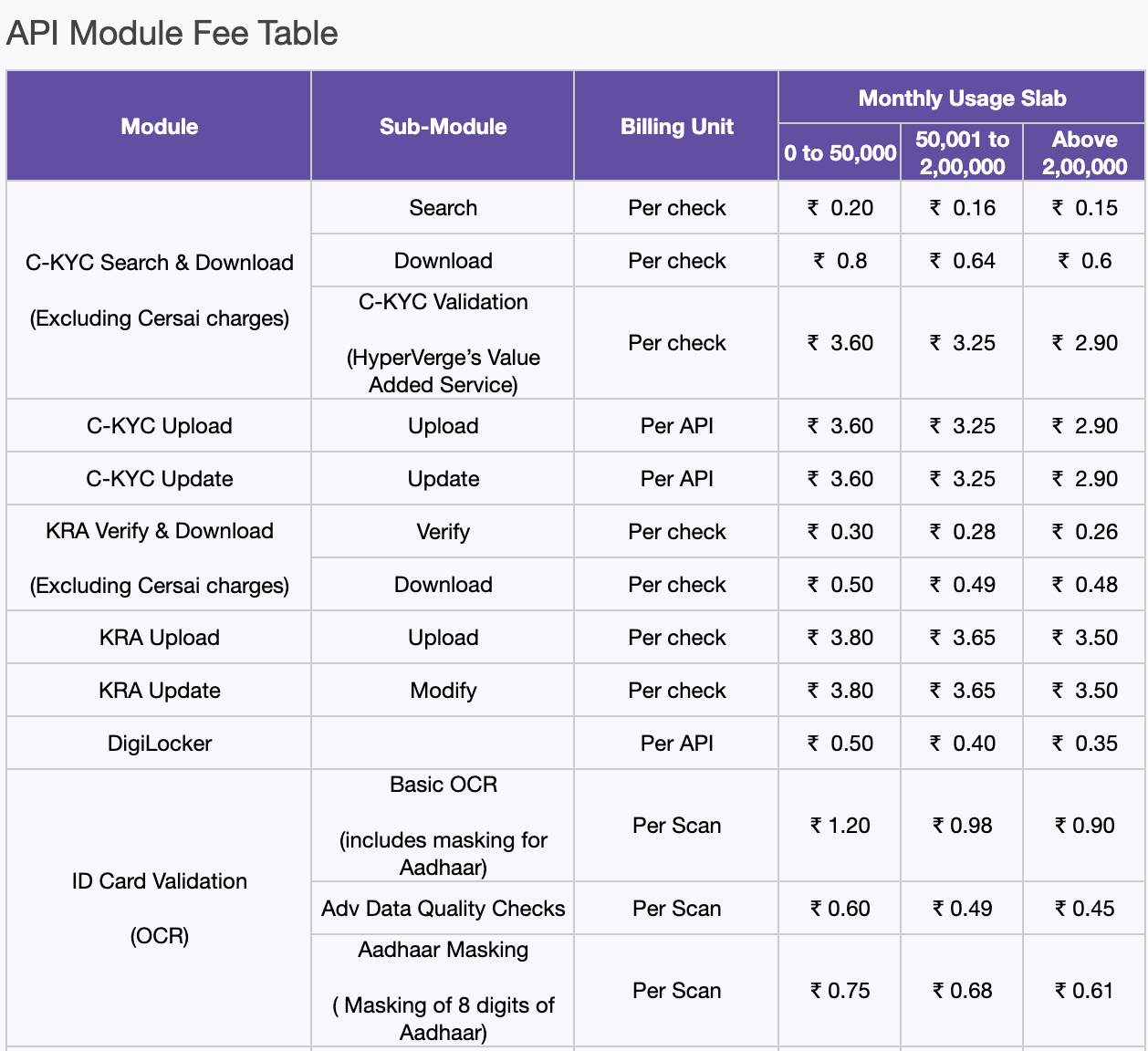
Logging & calculation
- Usage logging: every time a client uses a module — via workflow or direct API — the system logs the API hit to the billing DB.
- Pricing calculation: the total hits for each Module–Sub-module combination is counted; the unit price for that combination is applied.
Volume tiers (waterfall / tax-based billing)
Each module can have one or more volume tiers, and tiers can differ per module. Each tier's rate is applied only to the hits within that tier — not the entire volume.
Example: Module X pricing tiers are:
- 1–1,000 hits: Rs. 2
- 1,001–5,000 hits: Rs. 1
- 5,001+ hits: Rs. 0.5
For 12,000 hits: (1,000 × Rs.2) + (4,000 × Rs.1) + (7,000 × Rs.0.5) = Rs. 9,500.
Standard vs. client-specific
- Standard across all clients: list of modules and sub-modules, billable status codes for each, pricing tier calculation formula (tax-based), billing terms.
- Variable by client: unit pricing, volume tier ranges for each module.
Detailed example
Suppose a client consumes:
| Module | Unit | Consumption |
|---|---|---|
| ID Card Validation | OCR | 8,000 |
| ID Card Validation | Quality Checks | 5,000 |
| Geo Location from IP | — | 6,000 |
With pricing tiers:
| Module | Unit | Slab | Unit Price |
|---|---|---|---|
| ID Card Validation | OCR | 0–1,000 | Rs. 3 |
| ID Card Validation | OCR | 1,001–5,000 | Rs. 2 |
| ID Card Validation | OCR | 5,001+ | Rs. 1 |
| ID Card Validation | Quality Checks | 0+ | Rs. 2 |
| Geo Location from IP | — | 0–5,000 | Rs. 2 |
| Geo Location from IP | — | 5,001+ | Rs. 1 |
Total cost:
- ID Card Validation
- OCR: (1,000 × Rs.3) + (4,000 × Rs.2) + (3,000 × Rs.1) = Rs. 14,000
- Quality Checks: (5,000 × Rs.2) = Rs. 10,000
- Subtotal: Rs. 24,000
- Geo Location from IP: (5,000 × Rs.2) + (1,000 × Rs.1) = Rs. 11,000
- Overall total: Rs. 24,000 + Rs. 11,000 = Rs. 35,000
Category 2 — Platform Fee
Applies only to platform integrations (HyperKYC SDKs or Onboard links) — not to direct API integrations. Clients are billed for the number of unique, completed transactions processed by the platform.
Unique transactions
- Distinct transaction IDs processed in the billing cycle.
- If the same transaction ID is used in multiple workflows, each workflow execution counts as a separate transaction.
Completed transactions
- Transactions that have reached Auto Approved, Auto Declined, or Needs Review status at least once in the billing cycle.
- Transactions that only reach user cancelled or error status are excluded.
Example: a user attempts onboarding on Aug 25 → Auto Declined. The same user retries with the same transaction ID on Aug 26 → Needs Review. They attempt again on Sep 1 → Needs Review. Result: one unique, completed transaction in August and one in September.
Platform billing can be configured to count only Auto Approved and Needs Review statuses. WIP feature
Platform unit price
- Can be set at client level (covers all workflows) or at a specific workflow-ID level.
- Volume slabs are not supported for platform billing.
Module-count-based pricing
Platform fee can be varied based on the number of modules in the workflow to reflect complexity:
| Workflow | Fee per Completed Txn |
|---|---|
| Demat Account Opening | Rs. 10 |
| Modifications | Rs. 5 |
| Generic workflow | 0–4 modules = Rs. 0 • 5–8 modules = Rs. 5 • 9+ modules = Rs. 10 |
Module counting rule
- Included: every instance of marketplace modules (super modules), HyperVerge APIs directly added to the workflow, and client's internal APIs in the workflow.
- Excluded: form modules (pre-built templates or custom forms).
- Calculation is based on total modules in the workflow regardless of how many the end user actually completes.
Workflow versions
If modules are added or removed from a workflow, the workflow version is used during billing. WIP feature
Standard vs. client-specific
- Standard across all clients: key definitions, module counting rule, no volume-based pricing tiers, billing terms.
- Variable by client: unit pricing, module slab ranges.
Category 3 — Integration Fee
As mentioned in the pricing proposal template. See Pricing proposal templates below.
Category 4 — Production Support Fee
As mentioned in the pricing proposal template. See Pricing proposal templates below.
Minimum Monthly Commitment (MMC)
The system supports four MMC models. Model 1 is the simplest; Models 2 and 3 are designed to give clients time to ramp up before the final MMC applies.
Model 1: Fixed MMC
- Applied on the overall bill.
- Go-Live month: a prorated MMC is charged based on days live.
- Subsequent months: the full MMC is applied.
Model 2: Delayed MMC
- Applied on the overall bill.
- Go-Live month: no MMC.
- Next X months: no MMC.
- After X months: the full MMC is charged.
Model 3: Tiered MMC
- Applied on the overall bill.
- Go-Live month: prorated MMC 1 applied.
- Next X months: MMC 1 remains in effect.
- Thereafter: MMC 2 is applied (MMC 2 > MMC 1).
Model 4: Platform MMC
- No MMC for module usage.
- MMC applied only for platform fee, until usage exceeds platform MMC.
- Go-Live month: prorated MMC.
- Subsequent months: the full MMC is applied.
Billing terms
Billing cycle
Calendar month.
Billing date
1st of every month.
Billing method
Postpaid
- Recommended for most clients.
- Fully automated processes for usage tracking, invoice generation, and email notifications (see Auto-Invoice Generation).
Prepaid
- Used for high-risk segments or large enterprise clients.
- The billing system manages monthly usage, consumption calculation in billing currency, and reconciliation.
- The finance team handles balance tracking, low-balance alerts/reminders, and raising invoices.
Constraints:
- Unit prices must be fixed for a module/sub-module — they cannot depend on the pre-purchase amount or any other factor. Volume slabs can be applied.
- Minimum prepaid duration is quarterly (monthly prepaid is not supported).
- Prepayment is a single lump sum — it cannot be allocated to specific modules or used as "credits" that vary by module.
- All rules from the Pricing Categories apply to prepaid clients as well.
Billing currency
INR, USD, and NGR are supported. All unit prices for a client use the same currency; invoices are raised accordingly.
Environment
From the go-live date, billing applies to both staging and production AppIDs.
Business Unit
Billing and invoicing is done at the client level, not at the BU level. Clients can filter usage by BU, environment, and AppID in the HVOne dashboard for reconciliation purposes.
Status codes
Each module/unit has a set of billable status codes — usage outside these codes is not billed. Codes are listed under each module in the Admin Dashboard Modules tab. Module Product Owners maintain status codes and other module details.
Exceptions
1. Non-standard client pricing models
- If a client's pricing model does not align with the standard model, they should be billed manually every month.
- Such exceptions are allowed only in rare circumstances and must receive prior approval from Kedar, KV, or Kishore before signing the client contract.
- To request an exception, submit details in #process-contract-exceptions on Slack.
2. Non-standard module pricing
- No exceptions allowed. Every module must adhere to the standard model.
- If you are the PM of a module and unsure how to adhere to the standard model, start a discussion in #admin-dashboard-requests with the relevant information.
3. Multiple invoices under one Client ID
- In rare scenarios, multiple invoices can be supported under a single Client ID.
- This requires approval from the Finance and Legal teams before signing the contract.
- Raise a request in #admin-dashboard-requests on Slack with all necessary details.
Pricing proposal templates
- Enterprise
- Inside Sales — India / ROW
FAQs
If a user retries a module multiple times, are reattempts billed separately?
Yes. Billing is based on total API hits, so every retry is counted and charged accordingly.
Is there a charge for case management?
No. Case management is free, regardless of the number of users on the HyperVerge dashboard. The reason: to encourage clients to add more users and teams, fostering greater product engagement and stickiness.
How do clients view their billing numbers?
- HVOne Dashboard: shows consumption and pricing data for each billing cycle.
- Downloadable logs: offer detailed record-keeping for verification.
Why do we charge for "auto declined" transactions?
- Consistent and fool-proof: charging for auto-declined transactions discourages clients from artificially flipping "auto approved" to "auto declined."
- Value provided: even a declined transaction helps prevent fraud and reduce load on clients' review teams.
Why do we offer module slabs for platform billing?
Larger workflows often provide more value, so charging via module slabs accommodates varying complexity levels.