Generic Webhook — Integration Guide
Audience: Solutions engineers and integration engineers setting up webhooks for clients.
Before you start
The Configuration API is internal only.
- Config API Prod URL:
https://a4l5wq5l6gjkjrromxx3riovu40lpzcx.lambda-url.ap-south-1.on.aws/ - Config API Dev URL:
https://zi2btyam4ewqn4pb6kfz4bbkoq0yvwpg.lambda-url.ap-south-1.on.aws/ - Authentication:
appid+appkeyheaders (internal credentials) or JWT Bearer token
Setting up a webhook for an audit-portal client
Audit-portal automatically calls the generic webhook Config API whenever a client's webhook config is created or updated in audit-portal. You do not need to call the Config API manually for audit-portal clients.
When audit-portal creates/updates a config, it internally calls:
curl --request POST 'https://a4l5wq5l6gjkjrromxx3riovu40lpzcx.lambda-url.ap-south-1.on.aws/' \
--header 'appid: <INTERNAL_APPID>' \
--header 'appkey: <INTERNAL_APPKEY>' \
--header 'Content-Type: application/json' \
--data '{
    "appId": "<client-appid>",
    "eventType": "<event-type>",
    "isActive": true,
    "webhookUrl": "<client-webhook-url>",
    "product": "audit-portal",
    "headers": {},
    "updateSecret": true,
    "worfklows": {
        "<<workflowId1>>": ["url1"],
        "<<workflowId2>>": ["url2"]
    },
    "additionalMetadataKeys": ["workflowId"]
}'
It also calls GET with shareSecret: true to retrieve the HMAC secret and return it to the client.
Audit-portal configs table (relevant columns)
| Column | What it means |
|---|---|
appId | Client's app ID |
webhookUrl | Default webhook URL |
events | Array of event types enabled for this client. Only listed event types are delivered. |
newFlow | true = use generic webhook (S3 → SQS → Lambda). false = old deprecated direct flow. Default true for all new clients — ensure all configs have newFlow: true. |
headers | Custom headers to pass through to delivery |
additionalMetadataKeys | Set to ["workflowId"] to include workflowId in S3 file metadata, enabling workflow routing |
webhookPayloadBlacklistedKeys | Keys stripped from the payload before S3 upload. Default: ["workflowId"] — prevents routing keys from leaking to clients |
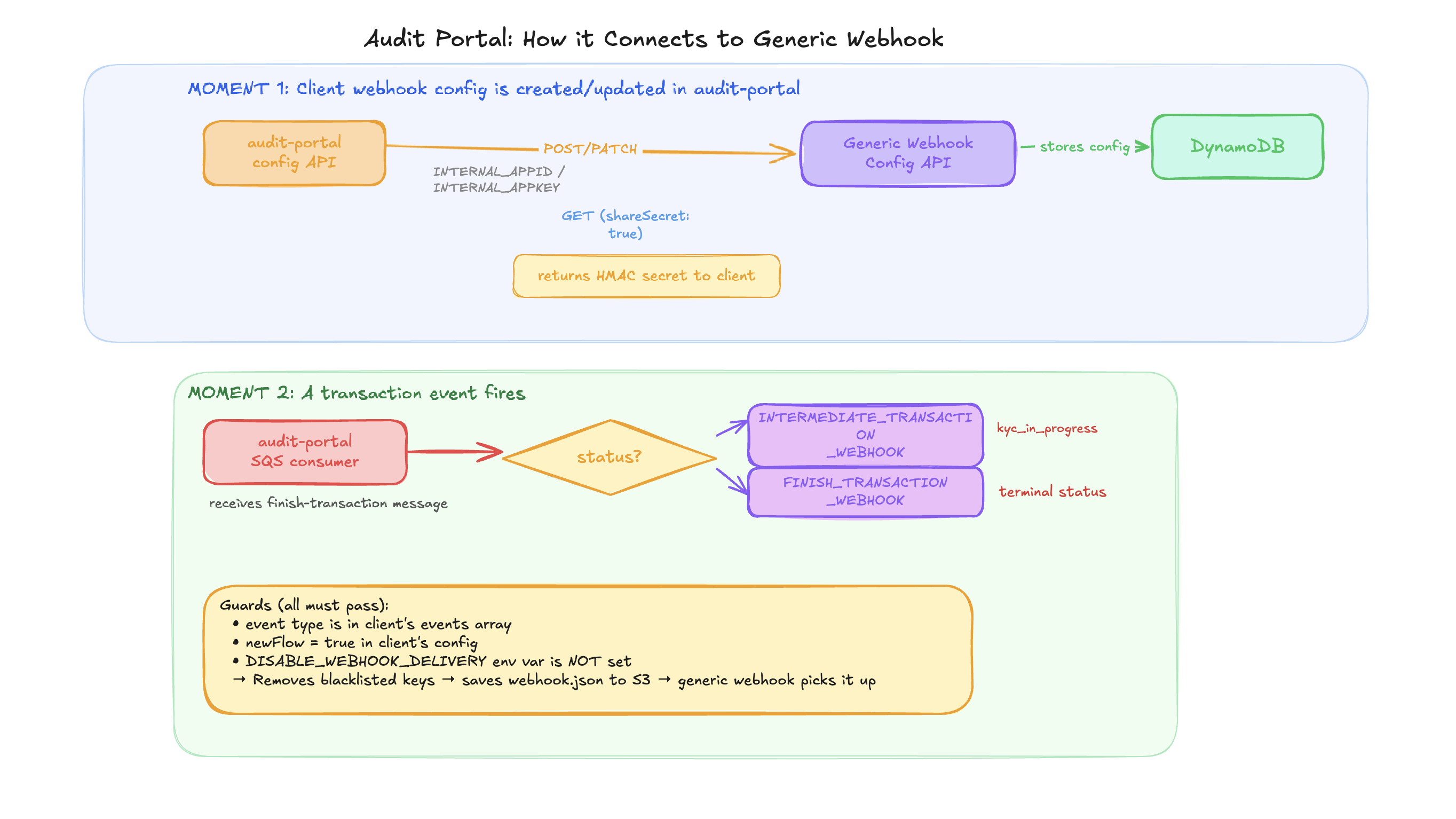
Audit-portal SQS consumer flow
Audit-portal consumes the dev-audit-portal-finish-transaction SQS queue. On each message:
- Calls
updateTransactionDBto process the transaction - If
status === "kyc_in_progress"→ triggersINTERMEDIATE_TRANSACTION_WEBHOOK - Any other terminal status → triggers
FINISH_TRANSACTION_WEBHOOK
To temporarily stop all audit-portal webhook delivery without code changes: set DISABLE_WEBHOOK_DELIVERY=yes env var.
Setting up a webhook for a link-kyc client
Link-KYC does not auto-call the generic webhook Config API. You must register configs manually.
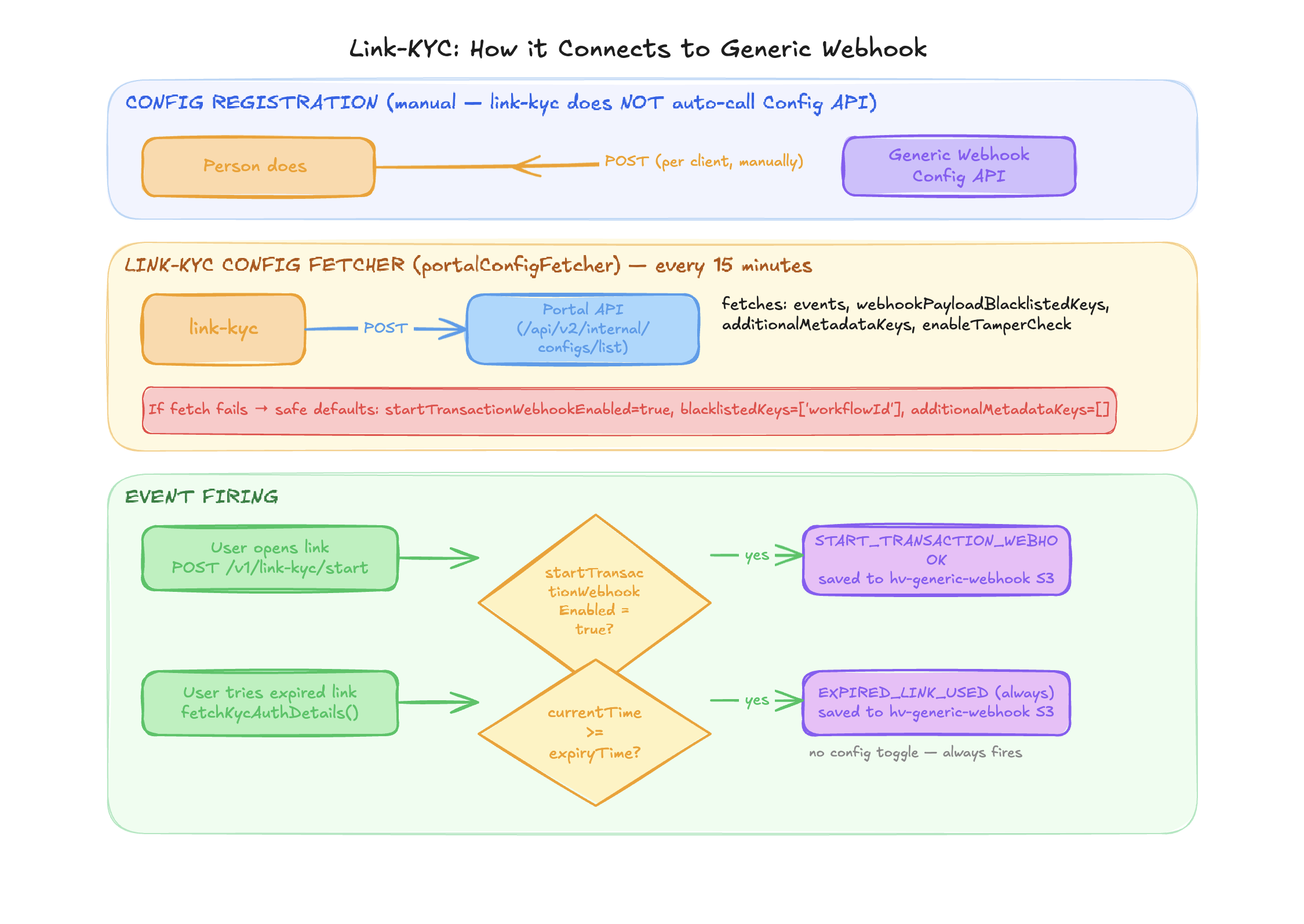
Step 1: Call the Config API to register the client's webhook config:
curl --request POST 'https://a4l5wq5l6gjkjrromxx3riovu40lpzcx.lambda-url.ap-south-1.on.aws/' \
--header 'appid: <internal-appid>' \
--header 'appkey: <internal-appkey>' \
--header 'Content-Type: application/json' \
--data '{
    "appId": "<client-appid>",
    "eventType": "START_TRANSACTION_WEBHOOK",
    "isActive": true,
    "webhookUrl": "https://client.example.com/webhook",
    "product": "link-kyc",
    "headers": { "Authorization": "Bearer client-token" },
    "updateSecret": true
}'
Repeat for each event type (START_TRANSACTION_WEBHOOK, EXPIRED_LINK_USED).
Step 2: Share the HMAC secret with the client:
curl --request GET 'https://a4l5wq5l6gjkjrromxx3riovu40lpzcx.lambda-url.ap-south-1.on.aws/' \
--header 'appid: <internal-appid>' \
--header 'appkey: <internal-appkey>' \
--header 'Content-Type: application/json' \
--data '{
    "appId": "<client-appid>",
    "eventType": "START_TRANSACTION_WEBHOOK",
    "shareSecret": true
}'
Link-KYC config source
Link-KYC fetches its delivery config from Portal API (not from DynamoDB directly):
- Polls
POST {PORTAL_BASE_URL}/api/v2/internal/configs/listevery 15 minutes - Fields fetched:
enableTamperCheck,events,webhookPayloadBlacklistedKeys,additionalMetadataKeys - Defaults if fetch fails:
startTransactionWebhookEnabled: true,webhookPayloadBlacklistedKeys: ['workflowId'],additionalMetadataKeys: []
Link-KYC vs audit-portal — key differences
| Aspect | Audit Portal | Link-KYC |
|---|---|---|
| S3 Bucket | prod-generic-webhook-ind | hv-generic-webhook (env: GENERIC_WEBHOOK_S3_BUCKET) |
| S3 path prefix | audit-portal/ | link-kyc/ |
| Auto-registers Config API | Yes | No — manual registration required |
| Config source | Generic webhook DynamoDB (via Config API) | Portal API polled every 15 min |
| Event types | FINISH_TRANSACTION_WEBHOOK, INTERMEDIATE_TRANSACTION_WEBHOOK, MANUAL_REVIEW_STATUS_UPDATE, APPLICATION_STATE_RESET | START_TRANSACTION_WEBHOOK, EXPIRED_LINK_USED |
| Kill switch | DISABLE_WEBHOOK_DELIVERY=yes | No equivalent |
Setting up a webhook for a new product (not audit-portal or link-kyc)
Step 1: Get PUTObject access to the prod-generic-webhook-ind S3 bucket.
Step 2: Register the client's webhook config via Config API:
curl --request POST 'https://a4l5wq5l6gjkjrromxx3riovu40lpzcx.lambda-url.ap-south-1.on.aws/' \
--header 'appid: <internal-appid>' \
--header 'appkey: <internal-appkey>' \
--header 'Content-Type: application/json' \
--data '{
    "appId": "<client-appid>",
    "eventType": "FINISH_TRANSACTION_WEBHOOK",
    "isActive": true,
    "webhookUrl": "https://client.example.com/webhook",
    "product": "your-product-name",
    "headers": { "Authorization": "Bearer client-token" },
    "updateSecret": true
}'
Step 3: When events occur in your product, upload webhook.json to S3:
<product-name>/<appId>/<YYYY-MM-DD>/<eventId>/<eventType>/webhook.json
File format:
{
  "metadata": {
    "appId": "<client-appid>",
    "transactionId": "<transactionId>",
    "eventType": "<event-type>",
    "eventId": "<unique-event-id>",
    "workflowId": "(optional - only if using workflow routing)"
  },
  "payload": {
    "(actual data to deliver to the client)"
  }
}
Step 4: Done. The Delivery Service Lambda picks it up automatically via SQS.
Configuring workflow-based routing
Use this when a client wants different webhook URLs for different workflows (e.g. standard vs premium KYC flows).
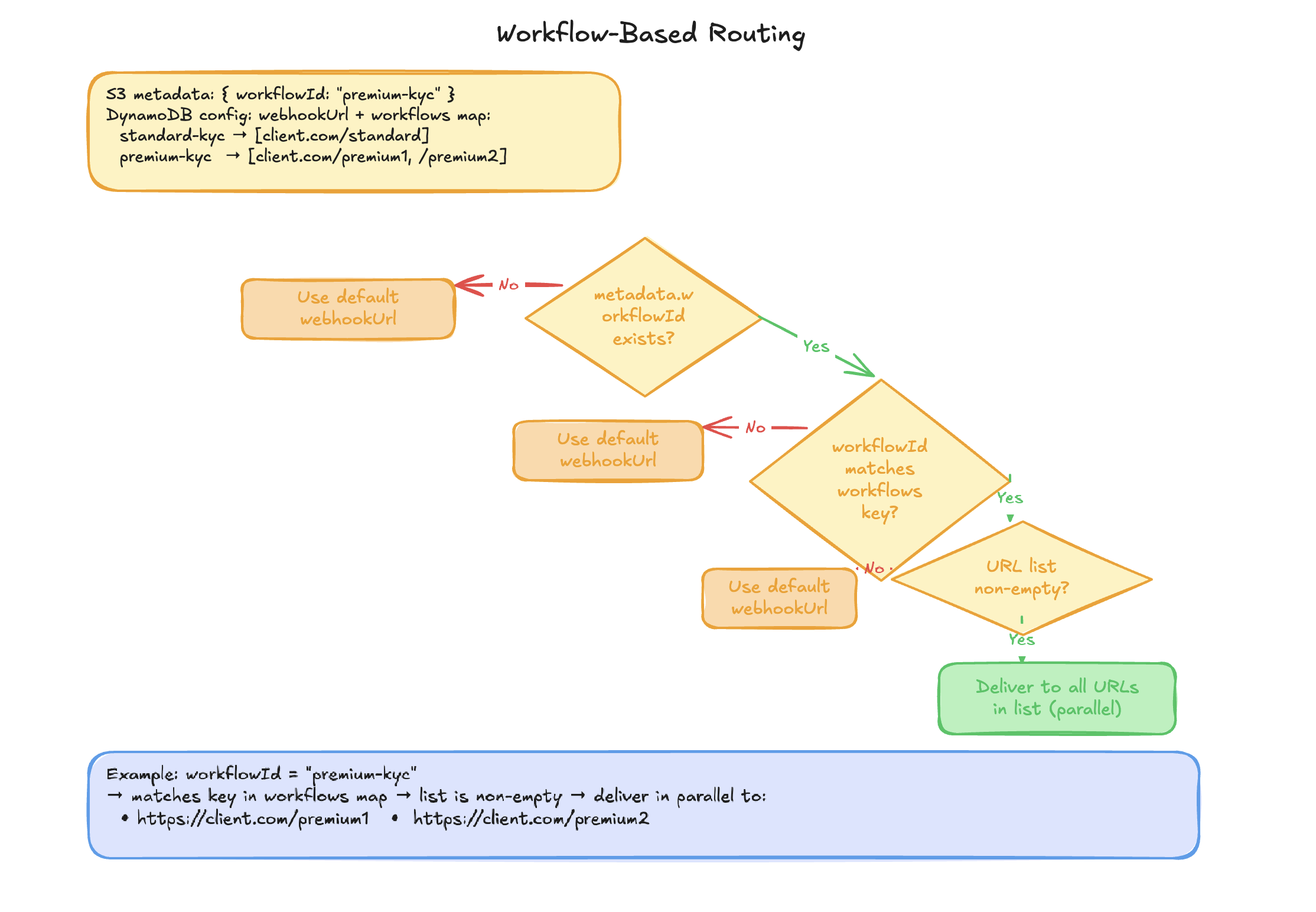
How to configure
Step 1: Enable workflowId in S3 metadata via the Audit Portal config API (uses the client's credentials):
curl --request PUT 'https://review-api.idv.hyperverge.co/api/v1/config' \
--header 'appId: <client-appid>' \
--header 'appKey: <client-appkey>' \
--header 'Content-Type: application/json' \
--data '{
    "additionalMetadataKeys": ["workflowId"]
}'
Step 2: Configure per-workflow URLs via the Config API (uses internal credentials):
curl --request PATCH 'https://a4l5wq5l6gjkjrromxx3riovu40lpzcx.lambda-url.ap-south-1.on.aws/' \
--header 'appid: <internal-appid>' \
--header 'appkey: <internal-appkey>' \
--header 'Content-Type: application/json' \
--data '{
    "appId": "<client-appid>",
    "eventType": "FINISH_TRANSACTION_WEBHOOK",
    "workflows": {
        "standard-kyc": ["https://client.com/standard-webhook"],
        "premium-kyc":  ["https://client.com/premium-webhook1", "https://client.com/premium-webhook2"]
    }
}'
How routing works at delivery time:
- If
metadata.workflowIdexists AND matches a key inworkflowsAND the URL list is non-empty → deliver to those URLs (in parallel if multiple) - Otherwise → fall back to default
webhookUrl
Notes:
- Workflow routing is supported for
FINISH_TRANSACTION_WEBHOOKandMANUAL_REVIEW_STATUS_UPDATEfrom audit-portal. The generic webhook system itself is event-type agnostic. - Multiple URLs per workflow are all delivered in parallel via
Promise.all() - Each
eventTypehas its own separate HMAC secret - The Config API is internal — do not share with clients
Updating a client's webhook config
To update a webhook URL, rotate a secret, toggle active state, or update headers:
curl --request PATCH 'https://a4l5wq5l6gjkjrromxx3riovu40lpzcx.lambda-url.ap-south-1.on.aws/' \
--header 'appid: <internal-appid>' \
--header 'appkey: <internal-appkey>' \
--header 'Content-Type: application/json' \
--data '{
    "appId": "<client-appid>",
    "eventType": "FINISH_TRANSACTION_WEBHOOK",
    "webhookUrl": "https://new-endpoint.example.com/webhook",
    "updateSecret": true
}'
Only the fields you send are updated. appId and eventType are the lookup key and cannot be changed.
To rotate the HMAC secret, pass "updateSecret": true. The new secret is returned in the response.
Pausing webhook delivery for a client
Set isActive: false to pause delivery without deleting the config:
curl --request PATCH 'https://a4l5wq5l6gjkjrromxx3riovu40lpzcx.lambda-url.ap-south-1.on.aws/' \
--header 'appid: <internal-appid>' \
--header 'appkey: <internal-appkey>' \
--header 'Content-Type: application/json' \
--data '{
    "appId": "<client-appid>",
    "eventType": "FINISH_TRANSACTION_WEBHOOK",
    "isActive": false
}'
Messages for inactive configs are logged as "EVENT NOT ACTIVE CURRENTLY" and considered successfully processed — no SQS retry.
Retrieving a client's HMAC secret
curl --request GET 'https://a4l5wq5l6gjkjrromxx3riovu40lpzcx.lambda-url.ap-south-1.on.aws/' \
--header 'appid: <internal-appid>' \
--header 'appkey: <internal-appkey>' \
--header 'Content-Type: application/json' \
--data '{
    "appId": "<client-appid>",
    "eventType": "FINISH_TRANSACTION_WEBHOOK",
    "shareSecret": true
}'
The secret is hidden from GET responses by default. Pass shareSecret: true to include it.
How clients verify the HMAC signature
Share this with clients:
const crypto = require('crypto');
const stringify = require('fast-json-stable-stringify');

function verifySignature(transactionId, payload, receivedSignature, secret) {
  const signedPayload = `${transactionId}_${stringify(payload)}`;
  const expected = crypto.createHmac('sha256', secret).update(signedPayload).digest('hex');
  return crypto.timingSafeEqual(Buffer.from(receivedSignature), Buffer.from(expected));
}

// Usage:
// transactionId - from the webhook body (payload.transactionId)
// payload       - the full webhook body object (as received, before any modification)
// receivedSignature - value of the x-hv-signature header
// secret        - the shared secret obtained from Config API GET with shareSecret: true
Important notes for clients:
- Use
fast-json-stable-stringify(or any library that sorts keys alphabetically) — notJSON.stringify - Always use
timingSafeEqualfor comparison — never=== - The secret is unique per
appId+eventTypepair - If the signature doesn't match, reject the webhook
Troubleshooting
| Problem | What to check |
|---|---|
| Webhook not delivered at all | Check DynamoDB config exists for appId + eventType. Check isActive is true. Check CloudWatch logs for Lambda errors. |
| Webhook delivered but client says it never arrived | Check generic_webhook_failure Redshift table. Check client's server logs. Check if SSL errors (see APP_IDS_TO_IGNORE_SSL_VERLIFICATION). |
| Client can't verify signature | Confirm they are using fast-json-stable-stringify (keys alphabetically sorted). Confirm transactionId is from the payload, not metadata. Confirm they are using the correct secret (per eventType). |
| Wrong URL being called | Check workflows config in DynamoDB. Check if workflowId is present in S3 metadata. |
| Webhooks stopped after config change | Verify isActive is still true. For audit-portal clients, verify newFlow: true. |
| Delivery succeeds but client gets wrong payload | Check webhookPayloadBlacklistedKeys in audit-portal config — keys listed here are stripped before S3 upload. Check deleteAppId flag in DynamoDB. |