How to Add Versions on Thomas APIs
This document explains how API versioning works in Thomas and how new API versions can be created using the Thomas UI.
Overview
Historically, all APIs in Thomas were accessed using:
{{baseURL}}/v1/<APIName>
Example:
{{baseURL}}/v1/fetchPANDetailed
This route continues to work for all existing APIs to maintain backward compatibility.
To enable proper API versioning, a new route format has been introduced.
New versioned route
The new versioned route format is:
{{baseURL}}/api/<version>/<APIName>
Example:
{{baseURL}}/api/v1/fetchPANDetailed
{{baseURL}}/api/v2/fetchPANDetailed
Versioning behavior
| Route | Behavior |
|---|---|
/api/v1/<APIName> | Works for all current APIs. |
/api/v2/<APIName> | Works only if the API name in Thomas UI has the prefix v2_. |
Example
If the API name in Thomas UI is:
v2_fetchPANDetailed
Then the API can be called as:
{{baseURL}}/api/v2/fetchPANDetailed
Versioned API naming convention
When creating versioned APIs in Thomas UI, the API name must follow this format:
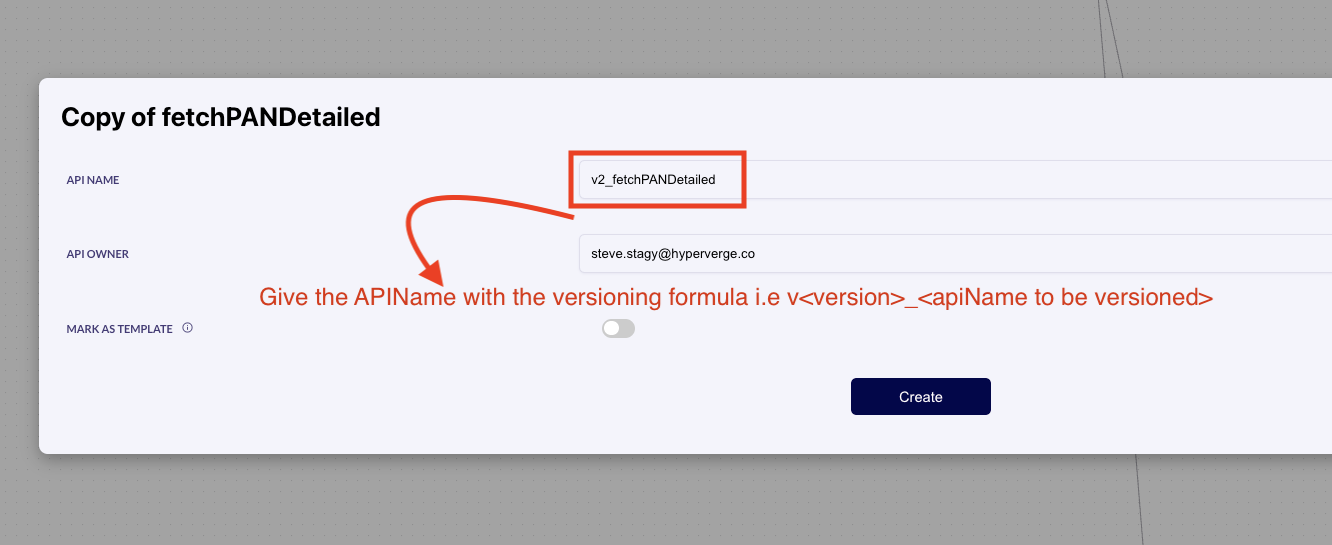
v<version>_<apiName>
Examples:
| Version | API Name in Thomas UI |
|---|---|
| v1 | v1_fetchPANDetailed |
| v2 | v2_fetchPANDetailed |
| v3 | v3_fetchPANDetailed |
This prefix allows the routing layer to correctly map:
/api/v<version>/<apiName>
to the correct API in Thomas.
How to create a new version of an API
There are two ways to create a new version using the Thomas UI.
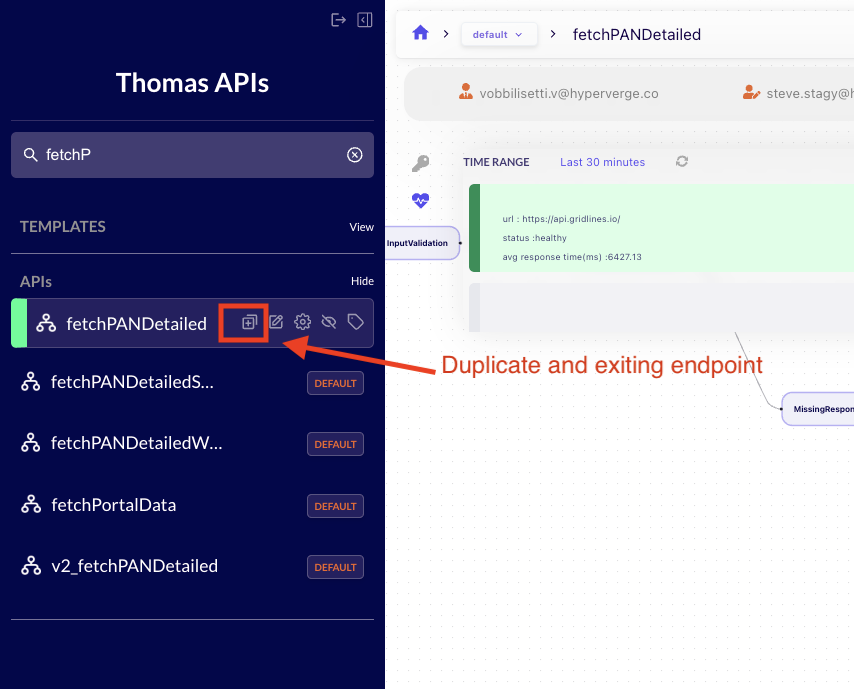
Method 1: Duplicate — if the new version is more or less identical to the parent (90% of cases)
- Navigate to the existing API in the Thomas UI.
- Click the Duplicate API icon.
- Rename the API using the versioning format
v<version>_<apiName>— e.g.,v2_fetchPANDetailed. - Save the API.
The new version will now be available via:
{{baseURL}}/api/v2/fetchPANDetailed
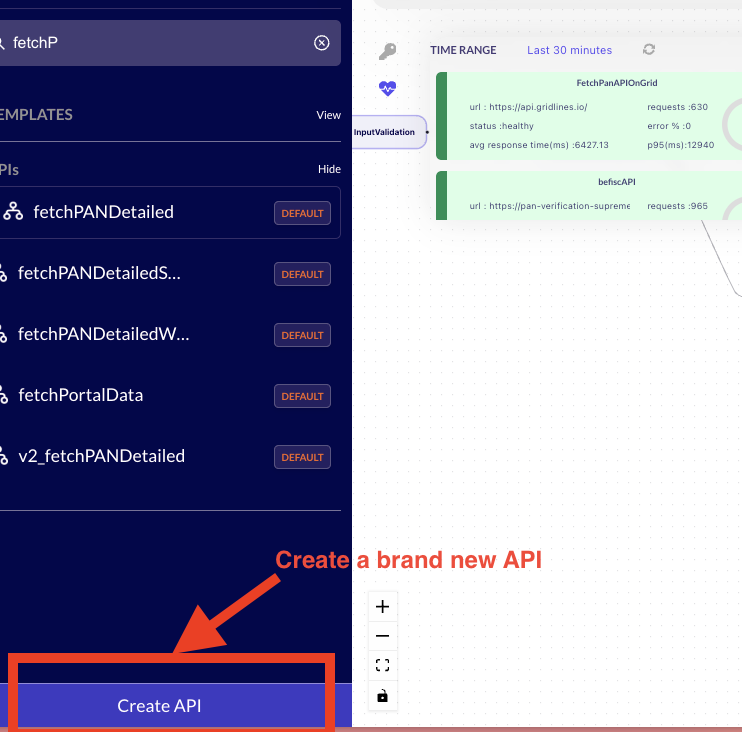
Method 2: Create new — if the new version is completely different from the parent
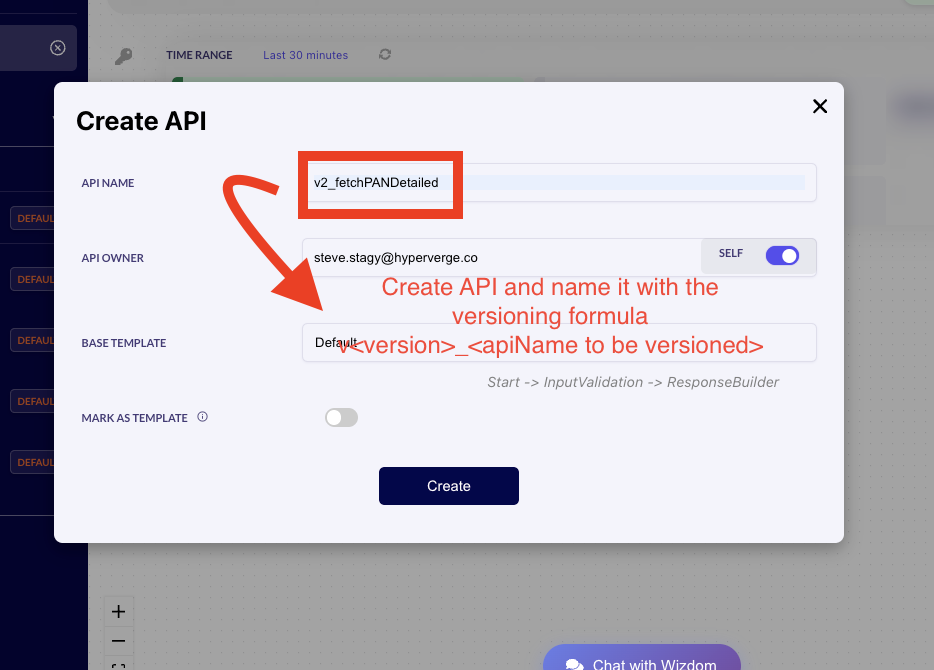
- Click Create API in the Thomas UI.
- Name the API using the versioning format
v<version>_<apiName>— e.g.,v2_fetchPANDetailed. - Build the API flow as required.
The API will automatically be available via:
{{baseURL}}/api/v2/fetchPANDetailed
Important note
Each version is treated as a separate API inside Thomas UI. This allows:
- Independent logic
- Independent vendor integrations
- Independent configuration per version (except
rateLimitand the billing module)
Future improvements (planned for the Thomas UI)
Version grouping
All versions of the same API will be grouped together in the left sidebar.
Example:
fetchPANDetailed
   ├── v1
   ├── v2
   └── v3
"Create New Version" button
Similar to Duplicate API, a new button will automatically generate the next API version.
Example:
fetchPANDetailed
→ Create Next Version
→ v3_fetchPANDetailed
This will enforce proper version naming automatically.