Selective State Reset for Non-Linear Workflows
Overview
Pre-read: Selective State Reset concept note.
A step is a branch in a non-linear workflow which contains modules/super-modules and can only be navigated through the index page. Examples: Nominee step (contains multiple dynamic forms to get the nominee details), Selfie & Face Match step, Esign step, etc.
Currently, if the user application has been rejected due to a particular step's data being incorrect, we only support resetting the state from that step onwards — resulting in the user being forced to redo multiple steps rather than just the particular steps. This problem is relevant for all branch (non-linear) workflows.
Solution
To solve for this problem, selective state reset has been introduced. The feature allows selectively clearing the module data and resetting the user's journey state for one or more journey steps (refers to a whole branch, e.g. Digilocker step, esign step), along with any steps that depend on them (cascade).
Prerequisites
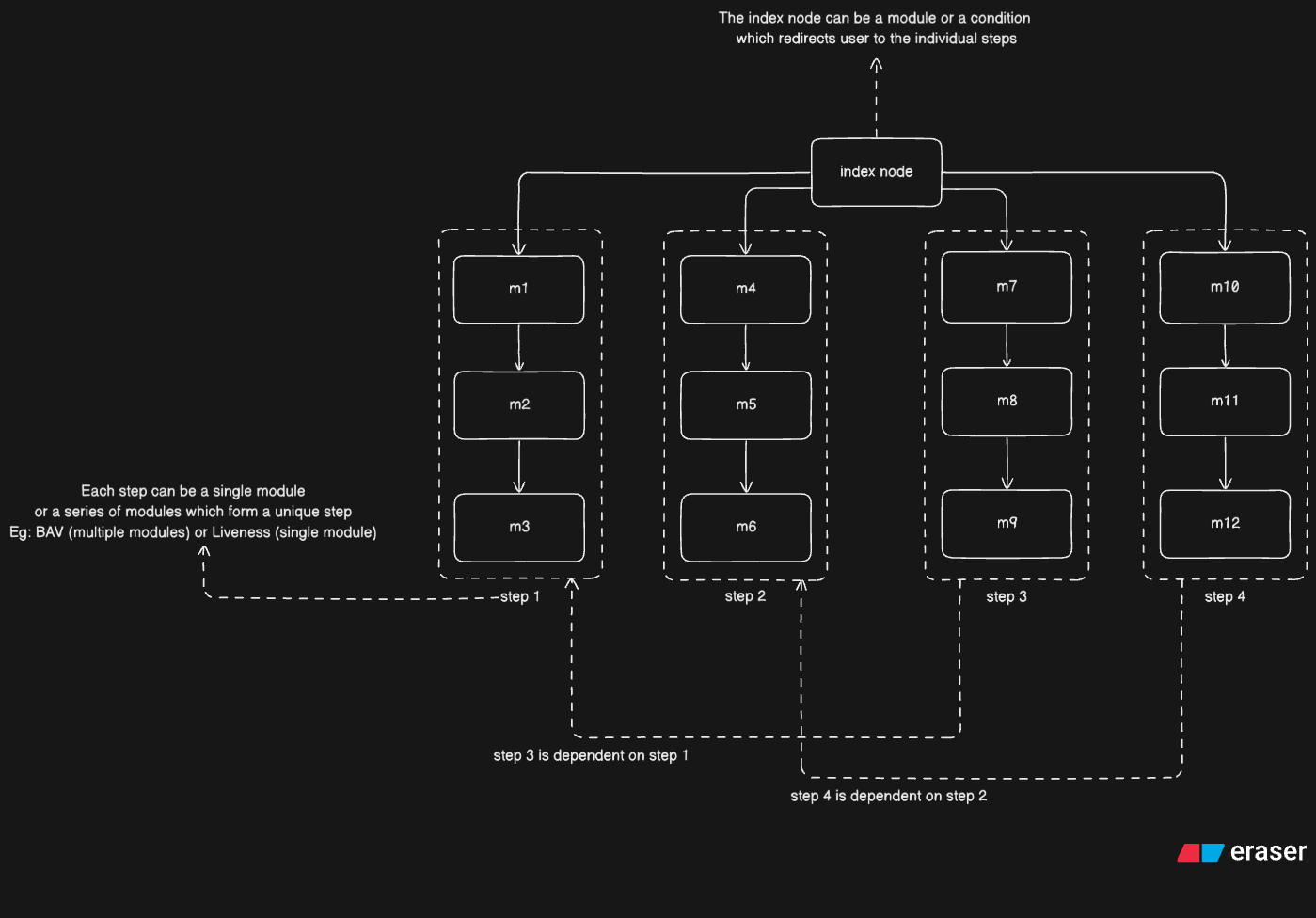
- The workflow should be non-linear with an index node (e.g. IIFL workflow).
- The only way to move from Branch A to Branch B should be through an index node. For example, in the above flow, user cannot go from
m3 → m4orm5 → m7.- The MEO for these type of journeys should be:
Mindex -> m1 -> m2 -> m3 -> Mindex -> m4 -> m5 -> m6 -> Mindexand so on.
- The MEO for these type of journeys should be:
- All
resumeFromvalues should be one of the modules of the same branch or the index page.- Example:
main form -> m1 -> m2 -> m3 -> main -> m4 -> m5 -> m6 -> auto_declined(possibleresumeFromvalues:[main form, m4, m5, m6]). - Setting the
resumeFromvalue in another branch (for example[m1, m2, m3, m4]) is not allowed.
- Example:
- Same as above for
conditionalResumeFrom. - All modules must have a
stepId.- For a single branch —
stepIdwould remain the same. - For an index node —
stepIdwould be different. - If
stepIdhas not been added in a module, it would not be shown in the options.
- For a single branch —
Example
{
    "type": "dynamicForm",
    "subType": "form",
    "id": "module_0S8znZ_form",
    "nextStep": "",
    "next_node_type": {},
    "version": "v1",
    "properties": {
        "sections": [
            {
                "id": "basic_details",
                "components": [
                    {
                        "id": "label_id1_nCzJDu",
                        "type": "label",
                        "subType": "title",
                        "text": "Personal Details"
                    }
                ]
            }
        ]
    },
    "name": "Customer Father Name and Marital status Form",
    "previousStep": "module_IGoScm_formV2",
    "stepId": "customer_details_form"
}
How to trigger Selective State Reset
The CPR state reset API can be used to trigger SSR for a specific transaction.
- The API removes
moduleToResumeFromand status for a particular transaction.- For example, if MEO is:
main form -> m1 -> m2 -> m3 -> main -> m4 -> m5 -> m6 -> auto_declined (resumeFrom - mainForm):- Let's say
m1, m2, m3is part of theselfie_validationstep. m4, m5, m6is thedigilockerstep.
- Let's say
- Originally, without SSR, the user would be redirected to the main form.
- If only the
digilockerstep is reset, themoduleToResumeFromis removed and the user will continue from them6step (instead of main form).
- For example, if MEO is:
- Recommendation: If user is auto-declined in a particular step, reset that step as well to avoid inconsistent behaviour.